Menu Reference
All Menu Items
Complete reference for every menu setting on the Radtel RT-900. Click any menu item to jump to a dedicated page with full usage notes.
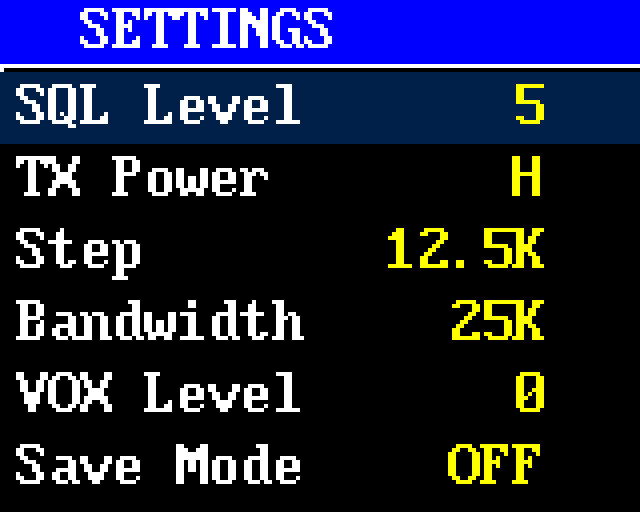
Accessing the menu
Press MENU to enter, UP/DOWN to scroll, MENU to confirm, EXIT to back out. The menu auto-exits after the configured timeout (default 10 seconds).
Channel Settings
| # | Name | Function | Options | Default |
|---|---|---|---|---|
| 1 | CHL Name | Channel name — the label displayed for the current memory channel | 12-char alphanumeric | (empty) |
| 2 | RX Frequency | Receive frequency for the current VFO or channel | Frequency input | — |
| 3 | TX Frequency | Transmit frequency for the current VFO or channel | Frequency input | — |
| 4 | R-CTCSS | RX CTCSS tone — squelch only opens when this analog sub-audible tone is detected on the incoming signal | Off + 51 tones (67.0–254.1 Hz) | Off |
| 5 | R-DCS | RX DCS code — squelch only opens when this digital coded sub-audible squelch stream is detected | Off + 210 codes + custom | Off |
| 6 | T-CTCSS | TX CTCSS tone — continuous sub-audible tone transmitted during PTT, typically required to access repeaters | Off + 51 tones (67.0–254.1 Hz) | Off |
| 7 | T-DCS | TX DCS code — digital coded sub-audible squelch transmitted during PTT | Off + 210 codes + custom | Off |
| 8 | BandWidth | Channel bandwidth — Wide (25 kHz) or Narrow (12.5 kHz) | Wide / Narrow | Wide |
| 9 | TXP | TX power level for the current channel | High / Low | High |
| 10 | Silence Mode | Speaker mute mode for the current channel | — | — |
| 11 | TX Forbid | Disable transmit on the current channel (receive only) | On / Off | Off |
| 12 | Shift DIR | Repeater offset direction — determines whether TX frequency is added to or subtracted from RX | Off / + / − | Off |
| 13 | OFFSET | Repeater frequency offset amount | Frequency input | 0 |
| 14 | MEMCH | Save current VFO settings into a memory channel slot | Channel 0–999 | — |
| 15 | DELCH | Delete a stored memory channel | Channel 0–999 | — |
| 16 | VFO FreqRang | VFO scan range — defines the frequency window for VFO-mode scanning | Frequency input | — |
Scanning
| # | Name | Function | Options | Default |
|---|---|---|---|---|
| 17 | Scan Mode | Scan resume method — how the scanner behaves when it finds an active signal | Time / Frequency / Fine | Time |
DTMF
| # | Name | Function | Options | Default |
|---|---|---|---|---|
| 18 | DTMFST | DTMF tone setting — controls when DTMF side tones are heard during transmission | Off / DT-ST / ANI-ST / DT+ANI | Off |
| 19 | PTT ID | PTT ID mode — whether to send the DTMF identifier at the beginning, end, or both sides of a transmission | Off / BOT / EOT / Both | Off |
| 20 | PTT-LT | PTT ID pre-delay — pause between PTT press and DTMF ID transmission so the repeater can identify first | 0 / 100 / 200 / 400 / 600 / 800 / 1000 ms | 0 |
Audio & Alerts
| # | Name | Function | Options | Default |
|---|---|---|---|---|
| 21 | Squelch | Squelch threshold — higher values require stronger signals to open the audio gate | 0–10 | 5 |
| 22 | RX Save | Battery-saver ratio — duty cycle of receiver active time vs sleep time in standby | Off / 1:1 / 1:2 / 1:4 | Off |
| 23 | VOX Switch | Voice-activated transmit — automatically keys PTT when microphone detects speech | Off / On | Off |
| 24 | VOX Level | VOX sensitivity — how loud audio must be to trigger voice-activated TX | Off / On | Off |
| 25 | VOX Delay | VOX hang time — how long TX stays active after voice drops, preventing rapid cycling | 0.5–2.0 seconds | 1.0s |
| 26 | TX OVer Time | TX timeout timer — automatically ends transmission after this duration to prevent accidental long keydowns | Off / 15–180s (15s steps) | 15s |
| 27 | Language | Menu language | English / Chinese | English |
| 28 | VOICE | Voice prompts — spoken confirmations when changing settings or menus | Off / On | On |
| 29 | Menu HangTime | Menu auto-exit timer — idle time before the menu closes automatically | 5–60 seconds | 10s |
| 30 | BEEP PROMPT | Keypad beep — audible feedback when pressing buttons | Off / On | On |
| 31 | Roger Beep | TX end tone — sound played to the other party at the end of your transmission | Off / Beep / Tone1200 | Off |
System
| # | Name | Function | Options | Default |
|---|---|---|---|---|
| 32 | POWER ON TYPE | Startup display mode — show the logo or a custom text message at boot | Logo / Message | Logo |
| 33 | Power On Tone | Startup beep played when the radio powers on | Off / On | On |
| 34 | Power on MSG | Custom startup message text shown when POWER ON TYPE is set to Message | Text input | — |
| 35 | POWER ON PWD | Power-on password — numeric code required before the radio becomes operational after boot | Numeric | Off |
| 36 | Dual Watch | Dual frequency receive — monitors VFO A and VFO B alternately | Off / On | Off |
| 37 | MDF-A | VFO A display mode — what to show on the A line of the main display | Name / Freq / Ch# / Name+Freq | Freq |
| 38 | MDF-B | VFO B display mode — what to show on the B line of the main display | Name / Freq / Ch# / Name+Freq | Freq |
Repeater
| # | Name | Function | Options | Default |
|---|---|---|---|---|
| 39 | RP-STE | Repeater squelch tail elimination — suppresses the tail from a repeater's transmission | 0–10 | 0 |
| 40 | RPT-RL | Repeater tail tone time — duration of the squelch tail signal sent to the repeater | 0–10 | 0 |
| 41 | ALERT | Alert tone frequency — used for CTCSS-access repeaters (1750 Hz is the European standard) | 1000 / 1450 / 1750 / 2100 Hz | 1000 |
Tuning
| # | Name | Function | Options | Default |
|---|---|---|---|---|
| 42 | Freq Step | VFO step size — the increment when tuning up/down with arrows | 2.5 / 5.0 / 6.25 / 10 / 12.5 / 20 / 25 / 50 kHz | 12.5 |
| 43 | Busy Lockout | Busy Channel Lockout — prevents TX when a signal is already present on the RX frequency | Off / On | Off |
| 44 | Side Tone | Transmit side tone format for MDC1200 PTT signalling | Off / MDC1200 | Off |
Alarm
| # | Name | Function | Options | Default |
|---|---|---|---|---|
| 45 | Alarm Mode | Alarm type — behavior when the alarm is triggered (on-site siren, broadcast sound, or broadcast code) | On Site / Send Sound / Send Code | On Site |
Programmable Keys
| # | Name | Function | Options | Default |
|---|---|---|---|---|
| 46 | PF1 | Side key 1 — short-press function assignment | None / Torch / Power / Scan / VOX / Alarm / Radio | None |
| 47 | PF1 LONG PRESS | Side key 1 — long-press function assignment | None / Torch / Power / Scan / VOX / Alarm / Radio | None |
| 48 | PF2 | Side key 2 — short-press function assignment | None / Torch / Power / Scan / VOX / Alarm / Radio | None |
Display
| # | Name | Function | Options | Default |
|---|---|---|---|---|
| 49 | ABR | Auto backlight timer — how long the LCD stays lit after the last interaction | 0–4 | 0 |
| 50 | Brightness | LCD brightness level | Adjustable | Max |
| 51 | LCD Reflex | LCD inversion — invert the display for readability in different lighting | On / Off | Off |
| 52 | AUTOLOCK | Automatic keypad lock — engages after idle timeout to prevent accidental key presses | Off / 3 levels | Off |
Other
| # | Name | Function | Options | Default |
|---|---|---|---|---|
| 53 | Radio Interrupt | Priority interrupt — whether the built-in FM broadcast radio can be interrupted by incoming 2-way transmissions | On / Off | Off |
| 54 | Reset | Factory reset — wipe VFO settings only, or all settings including channels | VFO only / All | — |
| 55 | STOP WATCH | Built-in stopwatch utility | — | — |
| 56 | VERSION | Firmware version — read-only display of current firmware identifier | Read-only | — |