Channels
Memory Channels
Overview
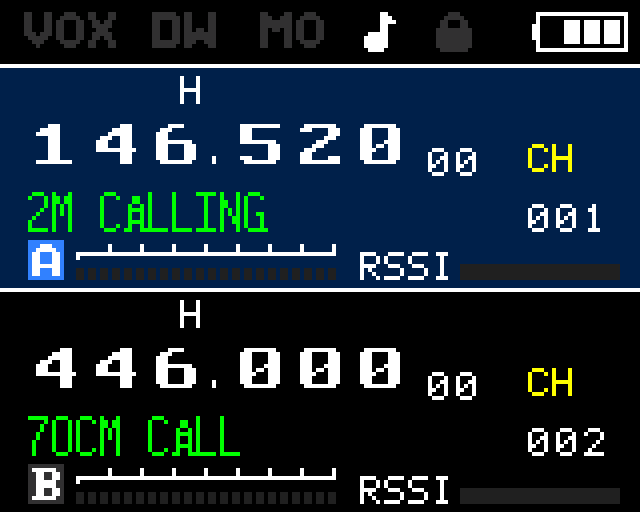
The RT-900 supports 256 channels in the standard configuration (up to 999 supported by firmware). This is more than the UV-K5's 200 channels, making it practical to store separate channel banks for different activities, locations, or services. Channels are organized internally in banks of approximately 128 channels per 4 KB flash sector.
Channel Data
Each channel stores a complete set of operating parameters:
| Field | Description |
|---|---|
| RX frequency | The receive frequency in Hz |
| TX frequency | The transmit frequency (may differ from RX for split/repeater) |
| RX CTCSS/DCS | Receive tone or DCS code for squelch filtering |
| TX CTCSS/DCS | Tone or DCS code transmitted with PTT |
| DTMF group | DTMF signaling group assignment |
| PTT ID mode | When to send PTT ID — beginning, end, or both |
| TX power | High, medium, or low |
| Bandwidth | Wide (25 kHz) or narrow (12.5 kHz) |
| Scan flag | Whether this channel participates in channel scanning |
| Enabled flag | Whether the channel is active and visible |
| Decoder code | Selective calling decoder setting |
| Name | Up to 12 alphanumeric characters |
Saving a Channel
Use menu 14 (MEMCH) to save the current VFO state to a channel slot.
| Step | Action |
|---|---|
| 1. Set up VFO | In VFO mode, tune to the desired frequency. Set tone, power, and bandwidth as needed. |
| 2. Open MEMCH | Press MENU and navigate to menu 14 (MEMCH), then press MENU to enter. |
| 3. Select slot | Use UP/DOWN to choose a channel number. Empty slots are shown as dashes. |
| 4. Confirm | Press MENU to write the current VFO state into that channel slot. |
Recalling a Channel
Press VM to switch to channel mode. Use the UP and DOWN arrow keys to step through channels, or enter the channel number directly on the keypad to jump to a specific slot.
Naming a Channel
Use menu 1 (CHL Name) to assign a name to a channel. Names can be up to 12 alphanumeric characters.
Faster channel naming
Entering names on the keypad one character at a time is tedious. Use the rfsplatter.com configurator to set names for all channels before flashing firmware.
Deleting a Channel
Use menu 15 (DELCH) to delete a channel. Navigate to the menu item, select the channel number to delete, and confirm. The channel slot is cleared — frequency, name, and all settings are erased. Deletion is permanent without re-programming.
Display Modes
Menu items 37 (MDF-A) and 38 (MDF-B) control what appears in the channel A and channel B display areas. Options are: channel name only, frequency only, channel number, or name + frequency.
See the Display Guide for a full breakdown of display mode options.
Dual VFO
VFO A and VFO B operate independently — each can be on a different frequency, mode, and channel. The AB key switches the active VFO between A and B.
Dual Watch
Enable Dual Watch via menu 36 to have the radio monitor both VFO A and VFO B simultaneously, switching to whichever receives a signal first.