Transmission
Transmission Guide
Everything about transmitting: PTT, power levels, repeater setup, tones, VOX, timing, and TX restrictions.
PTT Basics
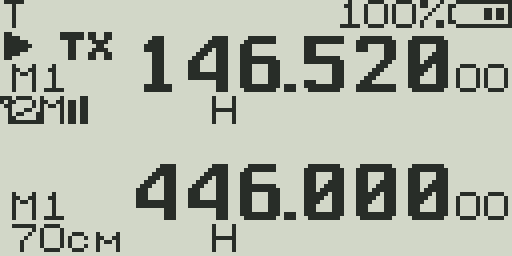
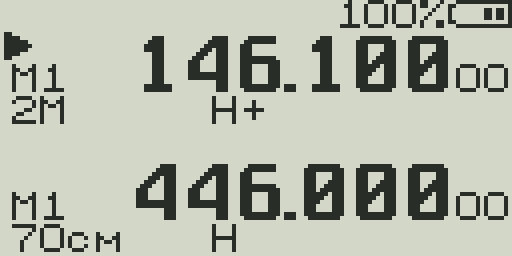
- Press and hold
PTTto begin transmitting. Release to return to receive. - The display shows
TXin the status bar during transmission. - The center bar switches from the RSSI graph to a TX audio level bar showing microphone input level.
- TX uses the active VFO frequency (accounting for any repeater offset).
TX will NOT activate if:
- Battery voltage is too low (critically depleted)
- BCL (Busy Channel Lockout) is ON and a signal is present
- The frequency is outside all enabled TX bands
- TX timeout has been exceeded (radio will auto-stop TX)
- F Lock is set to restrict the current frequency
Power Levels
Three power levels are available. Higher power means more range but shorter battery life and more heat.
| Level | Display | Approximate Power | Use when |
|---|---|---|---|
| LOW | L | ~0.5 W | Talking to someone nearby; saving battery; simplex close range |
| MID | M | ~2 W | Medium-range local communications; most everyday use |
| HIGH | H | ~4–5 W | Maximum range; hitting distant repeaters; DX |
F + 6Quickly cycle through Low → Mid → High → Low without opening the menu.CTCSS / DCS Tones
CTCSS (Continuous Tone-Coded Squelch System) and DCS (Digital-Coded Squelch) are sub-audible access tones used by repeaters and to filter out unwanted traffic.
- TxCode — The tone or code transmitted during PTT. Set this to the repeater's required access tone. Most VHF/UHF repeaters require CTCSS.
- RxCode — Filters incoming audio. Squelch only opens when the received signal carries this tone. Set to OFF for general monitoring; set to a tone for selective listening.
- CTCSS tones range from 67.0 Hz to 254.1 Hz (standard EIA frequencies).
- DCS codes are 3-digit numbers (e.g., 023, 114, 445) in normal (N) or inverted (I) polarity.
Unknown repeater tone?
Use CTCSS/DCS scan (F+4) while the repeater is active to identify the tone. See the Scanning Guide for details.
Repeater Setup
A repeater receives on one frequency (your TX) and retransmits on another (your RX). Configure an offset to handle this automatically.
| Step | What to do |
|---|---|
| 1. Set RX frequency | Tune to the repeater's output frequency (the one you'll receive on) |
| 2. Set offset direction (TxDir) | For VHF: usually + (your TX is higher). For UHF: usually + or −. Check repeater directory. |
| 3. Set offset amount (TxOffs) | Standard VHF: 0.600 MHz. Standard UHF: 5.000 MHz. Check your local repeater. |
| 4. Set TX tone (TxCode) | Enter the CTCSS or DCS tone required by the repeater. Many use 100.0, 103.5, or 107.2 Hz. |
| 5. Optional: set RX code | Set RxCode if you want squelch filtering (only open squelch when repeater's courtesy tone is present) |
| 6. Test | Press PTT briefly. You should hear the repeater's courtesy beep on release if you accessed it. |
Common offset table
| Band | Standard offset | Direction |
|---|---|---|
| 2m VHF (144–148 MHz) | 600 kHz | Usually + |
| 70cm UHF (440–450 MHz) | 5.000 MHz | Usually + or − |
| UHF (450–470 MHz) | 5.000 MHz | Usually + or − |
| GMRS (462–467 MHz) | 5.000 MHz | + |
Frequency Reverse (F+8)
Frequency reverse swaps the TX and RX offset, so you listen on the repeater's input frequency (where you transmit). This lets you check if the repeater input is active and whether your signal is making it to the repeater.
F + 8Toggle frequency reverse. The REV indicator appears on VFO line 2 when active. Press F+8 again to return to normal.Note: While in reverse, you are listening on the repeater input. You can still PTT from reverse mode, but your TX will now be on the repeater output frequency — avoid this in normal use.
VOX (Voice-Operated Transmit)
VOX activates PTT automatically when microphone audio exceeds a threshold. Useful for hands-free operation.
- Enable: set
VOXin the menu to a level (1–9).OFFdisables VOX. - Sensitivity: Level 1 = most sensitive (triggers on quiet sounds). Level 9 = least sensitive (requires loud speech).
- Tail delay: set
VoxDlyto control how long TX stays active after speech ends (0.5s / 1s / 2s). Prevents rapid PTT cycling. - The
VOXindicator appears in the status bar when VOX is active.
VOX tips
- Start at level 4–5 and adjust based on your environment.
- In noisy environments, set a higher VOX level to prevent background noise from keying up the radio.
- Set a longer VoxDly if your speech has natural pauses — prevents the TX cutting out mid-sentence.
- VOX does not work during charging or when headset is not connected on some configurations.
TX Timeout Timer (TxTOut)
The TX timeout automatically stops transmission after a set duration. This prevents accidentally holding the channel open (stuck PTT) and is required by many repeater systems.
- Set via
TxTOutin the menu: Off, 30s, 1–10 minutes. - Default is 3 minutes. This is appropriate for most repeater use.
- When timeout fires, the radio returns to receive and beeps. You must release and re-press PTT to transmit again.
- Set to
OFFonly if you have a specific need for unlimited TX time.
Busy Channel Lockout (BCL)
BCL prevents TX when a signal is present on the receive frequency. This avoids accidentally stepping on other users.
- Set
BCLto ON in the menu to enable. - When the channel is busy and you press PTT, the radio will not transmit and may beep.
- BCL is per-channel in some firmware configurations.
- Note: BCL uses the squelch threshold. If your squelch is set very tight, a signal that doesn't open squelch also won't trigger BCL.
Roger Beep
A Roger beep is transmitted at the end of each PTT press. It signals to the receiving party that you have finished speaking.
- Off — No beep transmitted.
- Roger — Standard single-tone beep sent at the end of TX.
- MDC — MDC1200-style data burst sent at the end of TX. Used with some trunked radio systems.
Set via Roger in the menu. Note: the beep is heard by the other party, not you.
Squelch Tail Elimination (STE / RP STE)
When you release PTT, some radios and repeaters leave a brief burst of white noise before the squelch closes. Squelch tail elimination sends a special signal to suppress this.
- STE — Sends a 55 Hz or 180-degree phase-reversed CTCSS burst at end of TX to tell the receiving radio to immediately close its squelch.
- RP_STE — Repeater STE. Tells the repeater to drop its TX squelch tail. Values 1–10 control the number of bursts sent.
- Both require compatible receiver/repeater hardware and firmware for the effect to work.
1750 Hz Tone Burst (European Repeaters)
Many European repeaters use a 1750 Hz tone burst to open access instead of CTCSS. Enable the 1750 Hz feature in the menu.
- Enable
1750Hzin the menu (set to ON). - When enabled, pressing
F + PTTsends the 1750 Hz tone. - Some implementations send the tone automatically at the start of PTT when enabled.
PTT ID (DTMF ANI)
PTT ID sends a DTMF string identifying your radio at the start or end of each transmission.
- Set the DTMF string in
ANI_ID(up to 8 digits). - Set
PTT_IDto Begin (sent at start of TX), End (sent at end), or Both. - Common use: dispatch systems that use DTMF ANI to identify caller units.
- The ID is sent as audible DTMF tones — the receiving party (or a DTMF decoder) will hear or decode them.
TX Frequency Restrictions (F Lock)
The firmware includes TX frequency locking to restrict transmission to authorized frequency ranges.
- F Lock → OFF: TX is only limited by the hardware TX bands (VHF 136–174 MHz, UHF 400–470 MHz).
- F Lock → FCC: Restricts TX to FCC Part 97 amateur bands (2m, 70cm).
- F Lock → CE: Restricts TX to ETSI-compliant European amateur bands.
- Tx_VHF / Tx_UHF: Independent enable/disable for each primary TX band.
- Tx_250 / Tx_350: Enable TX on 220–260 MHz or 350–400 MHz (experimental — hardware not optimized for these bands).
Accessing F Lock and TX band settings
These settings are in the hidden menu. Power off, then hold PTT + Side Key 1 while powering on to access them.