Reception
Reception Guide
FM, AM, and SSB reception, squelch control, dual watch modes, signal strength reading, and monitor mode.
Modulation Modes
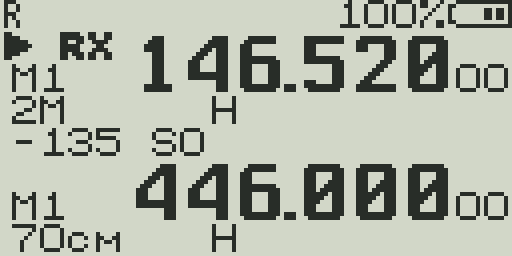
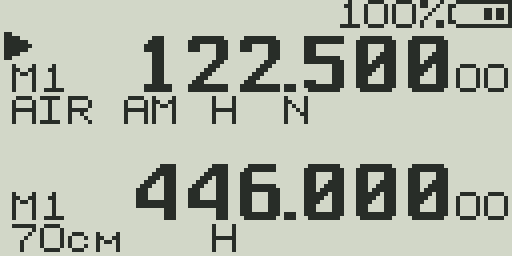
Set per-VFO via the Modula menu item. Shown on VFO line 2.
| Mode | Full name | Use for |
|---|---|---|
| FM | Frequency Modulation | Standard voice communications on VHF/UHF. Repeaters, ham radio, GMRS, FRS, business band, weather radio. |
| AM | Amplitude Modulation | Aircraft communications (108–136 MHz), AM broadcast (76–108 MHz), some military comms. Required for clear aircraft band reception. |
| USB | Upper Sideband (SSB) | Amateur HF/VHF SSB contacts, digital modes, some military/utility stations. Receive-only mode on this hardware — no SSB TX. |
Listening to aircraft
Set modulation to AM, tune to 118–137 MHz, and set bandwidth to Wide. If audio sounds distorted on strong stations, enable AM Fix. Aircraft communications use 25 kHz channel spacing.
Bandwidth (Wide vs Narrow)
Set via BandW in the menu. Shown on VFO line 2 as W or N.
| Setting | Filter width | Best for |
|---|---|---|
| Wide (W) | 25 kHz | FM broadcast, aircraft AM, older land-mobile radios, wider-deviation ham radio |
| Narrow (N) | 12.5 kHz | Modern narrow-band FM (NFM), commercial land-mobile, most amateur repeaters |
If a signal sounds muffled or lacks high-frequency audio, try switching to Wide. If you hear interference from adjacent channels, switch to Narrow.
Squelch (SQL)
Squelch mutes the speaker when no signal is present. Set via SQL in the menu (0–9).
| Level | Behavior | Use when |
|---|---|---|
| 0 | Open squelch — audio always on, even noise | Monitoring very weak signals, SDR-style monitoring |
| 1 | Opens on very weak signals | Marginal signal areas, DX monitoring |
| 2–3 | Opens on weak signals | General monitoring with some weak-signal capture |
| 4–5 | Default — medium sensitivity | Normal operations, repeater monitoring |
| 6–7 | Opens only on good signals | Busy environments; ignore distant/weak stations |
| 8–9 | Opens only on very strong signals | Local-only use; eliminate all distant signals |
The RSSI bar on the center line updates continuously even when squelch is closed, so you can see signal activity without opening squelch.
AM Fix
The UV-K5 uses a BK4819 chip that was not originally designed for wide-range AM reception. On strong AM signals, the automatic gain control (AGC) can cause distortion or pumping.
AM Fix (menu item: AM_Fix) applies a software correction to the gain registers when in AM mode, reducing distortion on strong AM signals.
- Enable AM Fix when: receiving aircraft communications, AM broadcast, or any AM signal that sounds distorted.
- Disable AM Fix when: receiving weak AM signals where AM Fix makes them worse, or when using FM/USB mode.
- AM Fix is automatically applied in AM mode on some builds. Others require manual toggle.
- Can also be assigned to a side key for quick toggle.
Dual Watch Modes
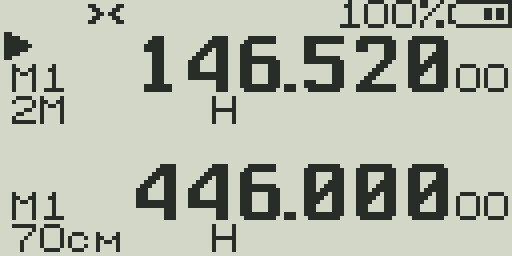
Dual Watch monitors both VFO A and VFO B simultaneously, switching between them. Set via DualW in the menu.
| Mode | TX behavior | RX behavior | Best for |
|---|---|---|---|
| Off | TX on active VFO only | RX on active VFO only | Normal single-frequency operation |
| Main Only (DW off) | TX on active VFO | Monitor both but audio only from active VFO | Checking if second VFO is active without full dual watch |
| DW RX Respond | TX on whichever VFO last received | Monitor both VFOs; respond on the VFO that received | Monitoring two different repeaters; responding on the one that called |
| Cross Band | TX on opposite VFO from RX | Monitor both VFOs | Cross-band relay; linked repeater operation |
| Main TX Dual RX | Always TX on main (active) VFO | Monitor both VFOs | Dedicated TX frequency + monitoring a second frequency |
DW indicator
DW appears in the status bar when any Dual Watch mode is active.
S-Meter / RSSI Bar
The center bar shows received signal strength (RSSI) as a horizontal bar graph. A numeric dBm value and S-unit are shown alongside.
- The bar updates in real time — even when squelch is closed and no audio is playing.
- dBm values are displayed as negative numbers (e.g.,
−107). Less negative = stronger signal. - S-units are approximate. S9 is typically −73 dBm; each S-unit below S9 is about 6 dB (roughly halving signal power).
- The RSSI bar shows noise floor activity. If the bar is jumping erratically without a known transmitter, there may be local interference.
See the Display Guide for the S-unit to dBm mapping table.
Monitor Mode (Open Squelch)
Monitor mode temporarily opens the squelch gate to hear all signals, regardless of the SQL level setting. Useful for checking if a frequency is truly clear or for listening to very weak signals.
- Assign the Monitor function to a side key via the
Key1,Key2, orKeyMmenu item. - Short press: toggle monitor mode on/off.
- Hold the key: monitor mode active while held, closes when released (on some builds).
- Monitor is different from setting SQL to 0 — monitor is temporary and doesn't change the SQL setting.