Messaging
Messenger
rfsplatter includes a built-in text messaging system that lets UV-K5 radios exchange short messages over FM radio frequencies — no internet, no infrastructure, just RF.
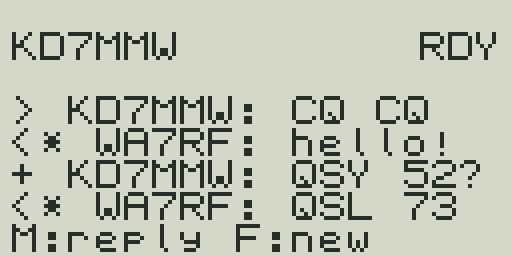
What is rfsplatter Messaging?
rfsplatter Messaging is a radio-to-radio text messaging system built directly into the firmware. Messages are encoded as FSK (Frequency Shift Keying) data bursts and transmitted on standard amateur or GMRS frequencies. Any two rfsplatter-equipped radios within range can exchange messages.
- No infrastructure required — works anywhere the radios can reach each other.
- Directed messages — send to a specific callsign, receive acknowledgment.
- Broadcasts — send to "CQ" for all nearby stations to receive.
- Legal on amateur bands — complies with FCC Part 97 rules. Your callsign is transmitted with every packet.
License required for amateur frequencies
Transmitting on amateur radio frequencies (145.800 MHz, 441.050 MHz) requires a valid amateur radio license. GMRS use (462.675 MHz) requires a GMRS license. Unlicensed transmission is illegal. See the Legal Notes section below.
Setting Your Callsign
Your callsign is required before you can send messages. It is embedded in the firmware at build time and transmitted with every packet.
- Go to rfsplatter.com/build.
- Scroll to the 3 — Messaging section in the left panel.
- Enter your FCC callsign in the Your Callsign field (up to 9 characters, uppercase).
- Optionally customize your preset messages.
- Make sure ENABLE_MESSENGER is checked in the features list, then click Build Firmware.
- Flash the built firmware to your radio.
Callsign is stored in EEPROM
Your callsign is saved in EEPROM and persists across power cycles. If you set it on rfsplatter.com before flashing, it becomes the default on first boot. You can change it anytime on the radio without reflashing. Your callsign is transmitted in every packet per Part 97 station identification requirements.
Accessing the Messenger
The messenger is launched via a programmable key function. Assign it to whichever key is most convenient for your use.
| Recommended assignment | How to set it |
|---|---|
| Side Key 2 — long press | Menu → Key2Lng → Messenger |
| Side Key 1 — short press | Menu → Key1Shrt → Messenger |
| Side Key 2 — short press | Menu → Key2Shrt → Messenger |
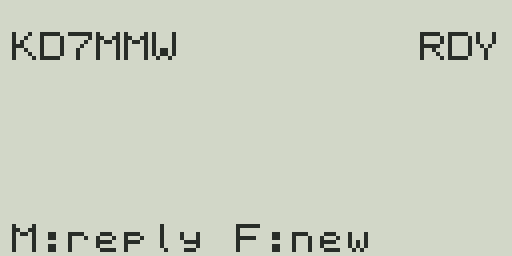
Once assigned, pressing that key opens the messenger inbox. If you have no messages, the inbox shows No Messages.
Composing a Message
Entering the Compose Screen
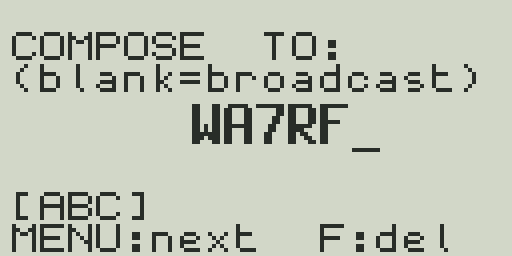
From the inbox, press F to compose a new message. You'll first enter the TO: callsign, then advance to the message body. Alternatively, press MENU from the inbox to quick-reply — it auto-fills the TO field with the sender's callsign and skips straight to the body.
Entering the Recipient Callsign (TO field)
The cursor starts in the TO field. Enter the recipient's callsign using T9 text input (see below). To send a broadcast heard by all nearby stations, leave it blank or enter CQ. Press MENU to advance to the message body. Use F to backspace.
T9 Text Input
Text is entered using the numeric keypad in multi-tap T9 style. Press a key repeatedly to cycle through its letters. Wait briefly or press another key to advance to the next character.
| Key | Characters (abc mode) | Characters (123 mode) |
|---|---|---|
| 1 | . , ! ? @ - _ ' " 1 | 1 |
| 2 | a b c 2 | 2 |
| 3 | d e f 3 | 3 |
| 4 | g h i 4 | 4 |
| 5 | j k l 5 | 5 |
| 6 | m n o 6 | 6 |
| 7 | p q r s 7 | 7 |
| 8 | t u v 8 | 8 |
| 9 | w x y z 9 | 9 |
| 0 | Space 0 | 0 |
| # | Backspace | Backspace |
Mode Switching
Press * to cycle through input modes:
- abc — lowercase letters
- ABC — uppercase letters
- 123 — digits only
The current mode is shown as a small indicator on the display. Callsigns in the TO field are always forced uppercase regardless of mode.
Using Preset Messages
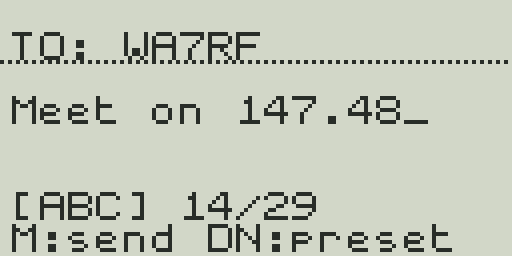
While in the message body field, press DOWN to cycle through your preset messages. Each press loads the next non-empty preset, replacing the current message text. Presets are configured on rfsplatter.com/build before flashing.
The default presets are:
| # | Default preset text |
|---|---|
| 1 | QSL 73 |
| 2 | QRZ? |
| 3 | CQ CQ CQ |
| 4 | QTH? |
| 5 | QSY 146.520 |
| 6 | EMERGENCY |
| 7 | TEST |
| 8 | (empty) |
You can also press UP to recall the last message you sent.
Compose Body Controls
| Key | Action |
|---|---|
| 0-9 | Type characters (T9 multi-tap) |
| * | Switch input mode (abc / ABC / 123) |
| F | Backspace — delete last character |
| DOWN | Cycle through preset messages |
| UP | Recall last sent message |
| MENU | Send the message |
| EXIT | Cancel and return to inbox |
Sending
When your message is ready, press MENU to transmit. The radio keys up briefly on the messaging frequency and sends the FSK packet. For directed messages, the radio automatically retries up to 3 times if no acknowledgment is received within 5 seconds.
Reading Your Inbox
When a message is received, the radio plays a brief alert tone and the inbox counter updates. Open the messenger via your assigned key to view messages.
Inbox Controls
- Press
Fto compose a new message. - Press
MENUto reply to the last received message (auto-fills the TO field with the sender's callsign). - Press
EXITto close the messenger and return to the main display.
Message Prefixes
Each message in the inbox has a prefix character indicating its type and delivery state:
| Prefix | Meaning |
|---|---|
| > | Sent — your outgoing message, waiting for acknowledgment |
| + | Delivered — recipient acknowledged receipt |
| < | Received — broadcast message from another station |
| <* | Directed — message addressed to your callsign |
| <~ | Overheard — directed message to someone else |
| R | Retrying — automatic retry in progress (up to 3 attempts) |
| X | Failed — no acknowledgment after all retries |
Auto-Acknowledge
When your radio receives a directed message addressed to your callsign, it automatically transmits an acknowledgment (ACK) packet after a short delay. This confirms receipt without requiring manual action.
- ACK delay: 100–500 ms after message receipt. The delay is randomized slightly to reduce collisions on busy channels.
- Directed messages only: Auto-ack is only sent for messages addressed to your callsign. Broadcast (CQ) messages do not trigger an ACK.
- ACK content: The ACK packet contains your callsign, the sender's callsign, and the message sequence number.
- The sender's radio updates the message prefix from
>to+when the ACK is received.
Broadcasting (CQ)
Sending a message to CQ transmits a general call received by all rfsplatter radios within range. No acknowledgment is expected or sent.
- Useful for calling frequencies, check-in messages, or emergency alerts.
- Any radio monitoring the messaging frequency will receive and display the broadcast.
- The sender's callsign is still included in the packet for identification.
- Broadcast messages appear with a
>prefix in the sender's inbox and<on the receiver's end.
Default Messaging Frequencies
The messenger uses dedicated data frequencies for message transmission. These are separate from the VFO frequencies you are monitoring. The radio switches to the messaging frequency momentarily to send or receive, then returns to the main VFO.
| Band | Default frequency | License required |
|---|---|---|
| VHF (2m) | 145.800 MHz | Amateur (Technician or higher) |
| UHF (70cm) | 441.050 MHz | Amateur (Technician or higher) |
| GMRS | 462.675 MHz | GMRS license |
The active messaging frequency is selected based on the VFO band at the time of sending. You can customize these frequencies on rfsplatter.com/build before building your firmware. All radios exchanging messages must use the same messaging frequency.
Legal Notes
rfsplatter Messaging is designed to operate within the requirements of FCC regulations.
- Part 97.309 — AFSK, FSK, and data: Amateur radio data transmissions are permitted under FCC Part 97.309. rfsplatter uses FSK, which is an authorized emission type on amateur frequencies.
- Public protocol: The messaging protocol is fully open and documented. Any party can decode the transmissions with appropriate software-defined radio equipment.
- Callsign in every packet: Your callsign is transmitted in the clear as part of every message packet, satisfying the station identification requirements of Part 97.119.
- No encryption: Message content is not encrypted. Encryption of message content is prohibited on amateur radio frequencies under Part 97.113(a)(4). rfsplatter Messaging does not encrypt message payloads.
- GMRS restrictions: GMRS (Part 95) has more restrictive data rules. Consult Part 95.1733 for permitted data uses on GMRS frequencies.
Transmit only with a valid license
You are responsible for ensuring you hold the appropriate license for any frequency you transmit on. rfsplatter takes no responsibility for unlicensed or improper use.